
Leveraging Intelligent Data Snapshotting for Precise Time Series Analysis
How capturing the state of your business at a point in time turns static reports into trend detection, drift monitoring, and decisions across every location.
A guide to point-in-time analysis and time series
A data snapshot is a copy of your data captured at a specific point in time. It freezes the state of a dataset, a metric, or an entire system on a given day, so you can compare that moment against every other moment you have captured.
Most business data tools only show you the current state.
- Today's pipeline
- This month's revenue
The dashboard refreshes and yesterday is gone. Snapshotting keeps yesterday.
It keeps last Tuesday, last quarter, and the same week a year ago. When you line those captures up in order, you get a time series analysis of how the number actually moved, not just where it landed.
This guide covers what a data snapshot is, how it differs from an event, why it is the foundation of point-in-time analysis, and how snapshots over time let a distributed business catch problems at one location before they reach the P&L.
What is a data snapshot?
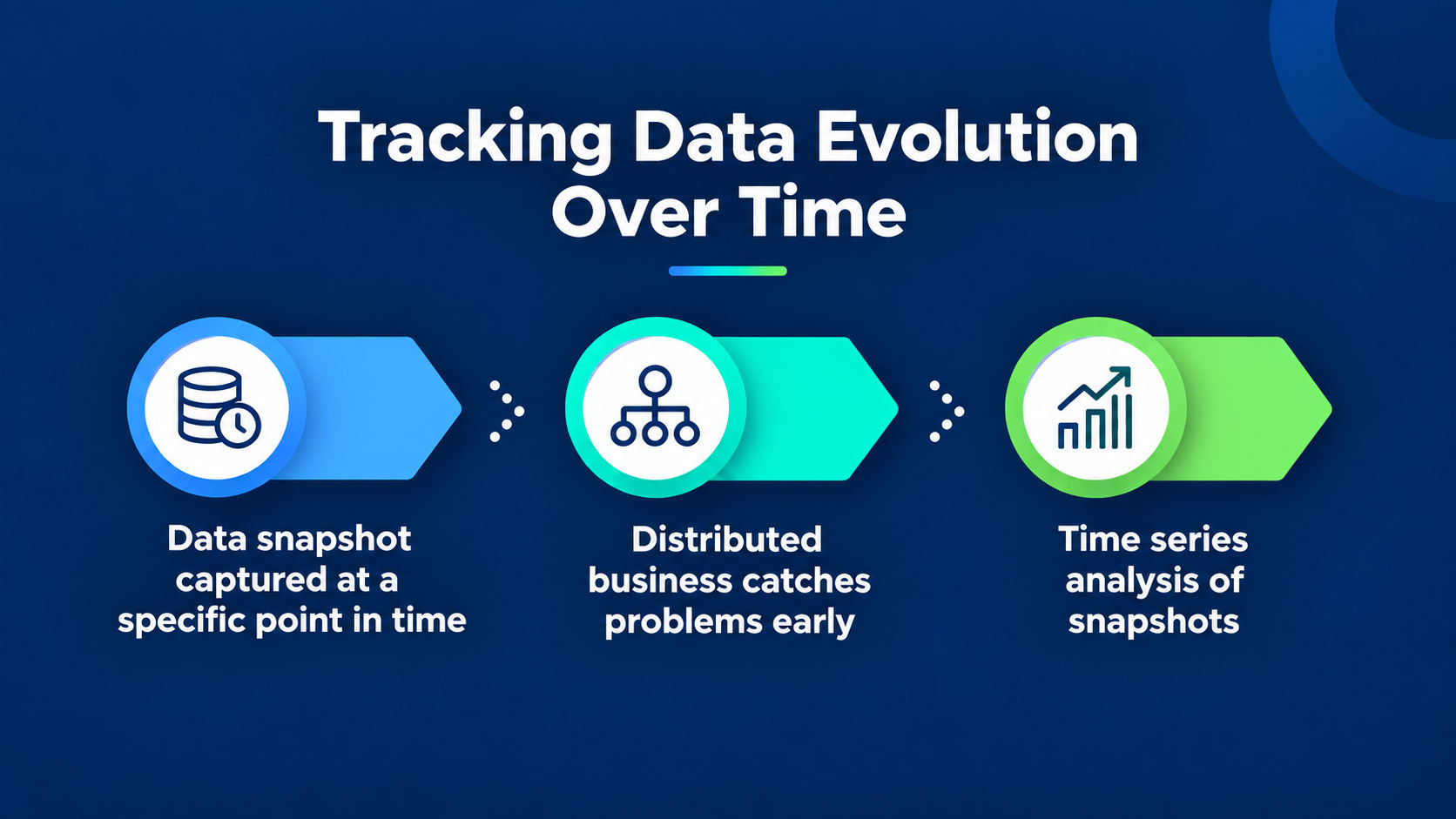
A data snapshot is a static, point-in-time copy of data that records the state of a system exactly as it was on a given date. Think of it as a photograph of your data.
The photo does not change when the subject moves. Neither does the snapshot.
A snapshot captures three things that a live report throws away:
- The values as they stood, before anyone updated, corrected, or overwrote them
- The date and time of capture, so the record is anchored to a moment you can return to
- The full set of records in scope, not just the ones that survived to today
An example
Here is the concrete version. A pipeline report on March 1 shows 40 open deals worth $2.1M. On April 1 it shows 38 deals worth $2.4M. Without snapshots, April overwrites March and you only ever see the latest state.
With a data snapshot of each date, you can see which deals slipped, which closed, which were re-forecast upward, and which quietly disappeared. The movement is the insight, and the movement only exists if you kept both months.
A live dashboard answers where you are. A stack of snapshots answers how you got there, and whether it is about to happen again.
How is a snapshot different from an event?
A snapshot is a status. An event is a change. This distinction is the one most teams overlook, and it is where a surprising amount of reporting confusion begins.
Snapshot vs Event
- A snapshot is the state of a subject at a point in time. Number of open opportunities today. Headcount on the first of the month. Occupancy this Tuesday. It is usually an aggregate, often a count.
- An event is a single thing that happened at a moment. A deal was created. A guest checked in. A ticket was closed. Events are the individual changes that, added up over time, move the snapshot.
How Snapshots and Events are used under historical data analysis
Both are forms of historical data analysis, but they answer different questions.
- Events tell you what happened
- Snapshots tell you what things looked like
You need snapshots when your source system does not keep history, which is most CRMs, most spreadsheets, and most operational tools.
They show the current record and forget the last one.
That is the trap. When a Salesforce field gets overwritten, the old value is gone.
The report is accurate for today and silent about every day before it. Snapshotting is how you rebuild the history your systems never stored.
Built for the businesses that run everywhere at once.
Scoop exists to bring best-in-class operational diagnostics to every distributed business, not just the ones big enough to staff a team for it. Meet the people building it.
- Operator-first by design
- Built for distributed teams
- Diagnostics, not dashboards
Why does snapshotting matter for time series analysis?
Snapshotting matters because most business data is not stored as time series, and time series analysis needs it to be.
A time series is a sequence of data points recorded at consistent intervals.
Snapshots are how you manufacture that sequence from systems that only ever hold the present.
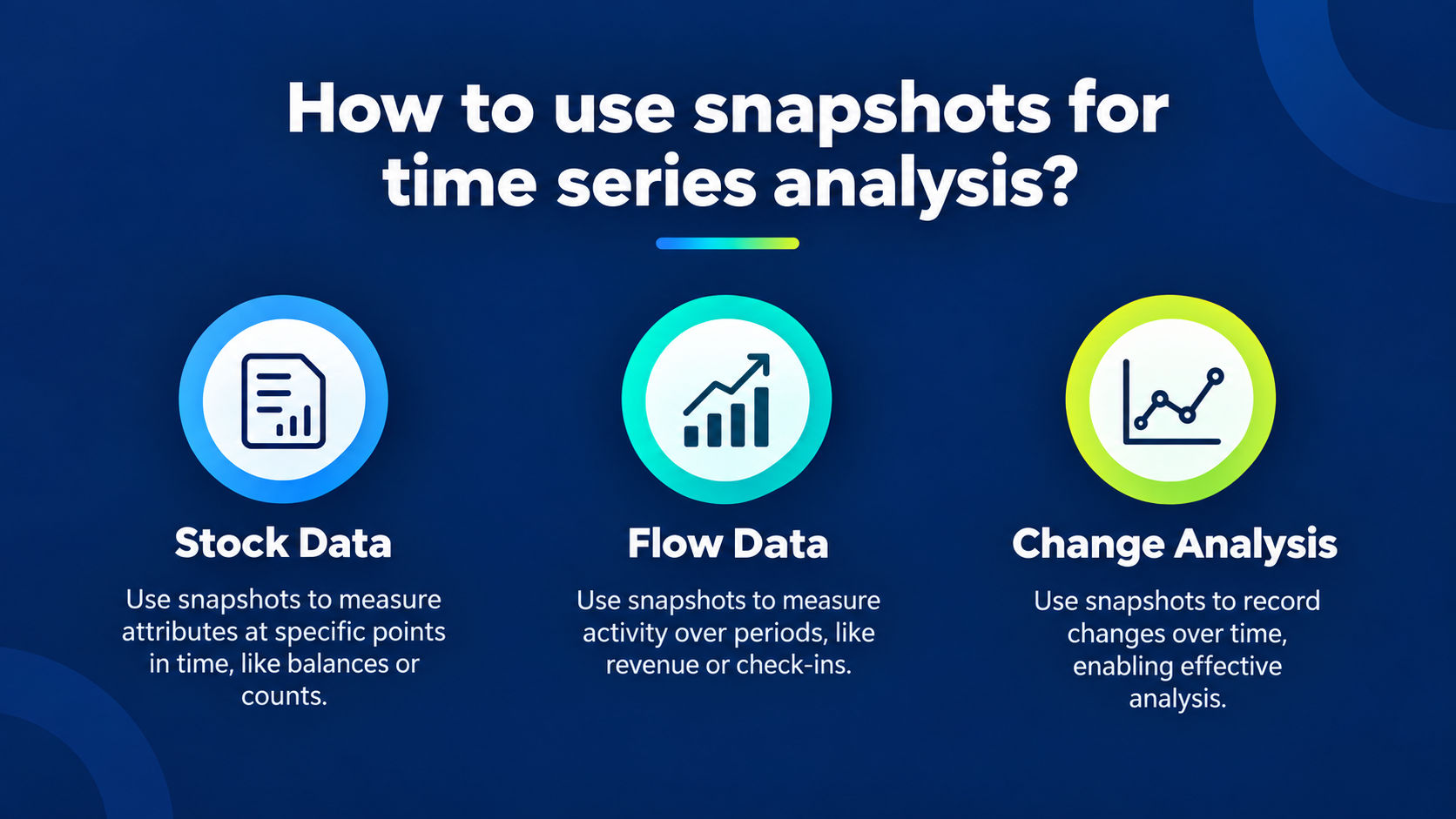
Time series data itself comes in two shapes, and snapshots are how you capture the first one:
- Stock data measures an attribute at a point in time. A balance. A count of open deals. Occupancy. This is a snapshot, by definition.
- Flow data measures activity over a period. Deals closed this week. Revenue booked this month. Check-ins per day. This is the sum of events across an interval.
Why stock data and flow data belong in a time series
A sales team tracking open pipeline needs stock snapshots on a schedule.
A team tracking bookings needs flow totals per period. Line either up in date order and you can run trend analysis to separate a real directional shift from ordinary week-to-week noise.
This is also the honest answer to a question people ask about change analysis with data snapshots: you cannot analyze change you did not record.
Snapshotting is the recording step. Everything downstream, from forecasting to drift detection, depends on it.
How does data snapshotting work?
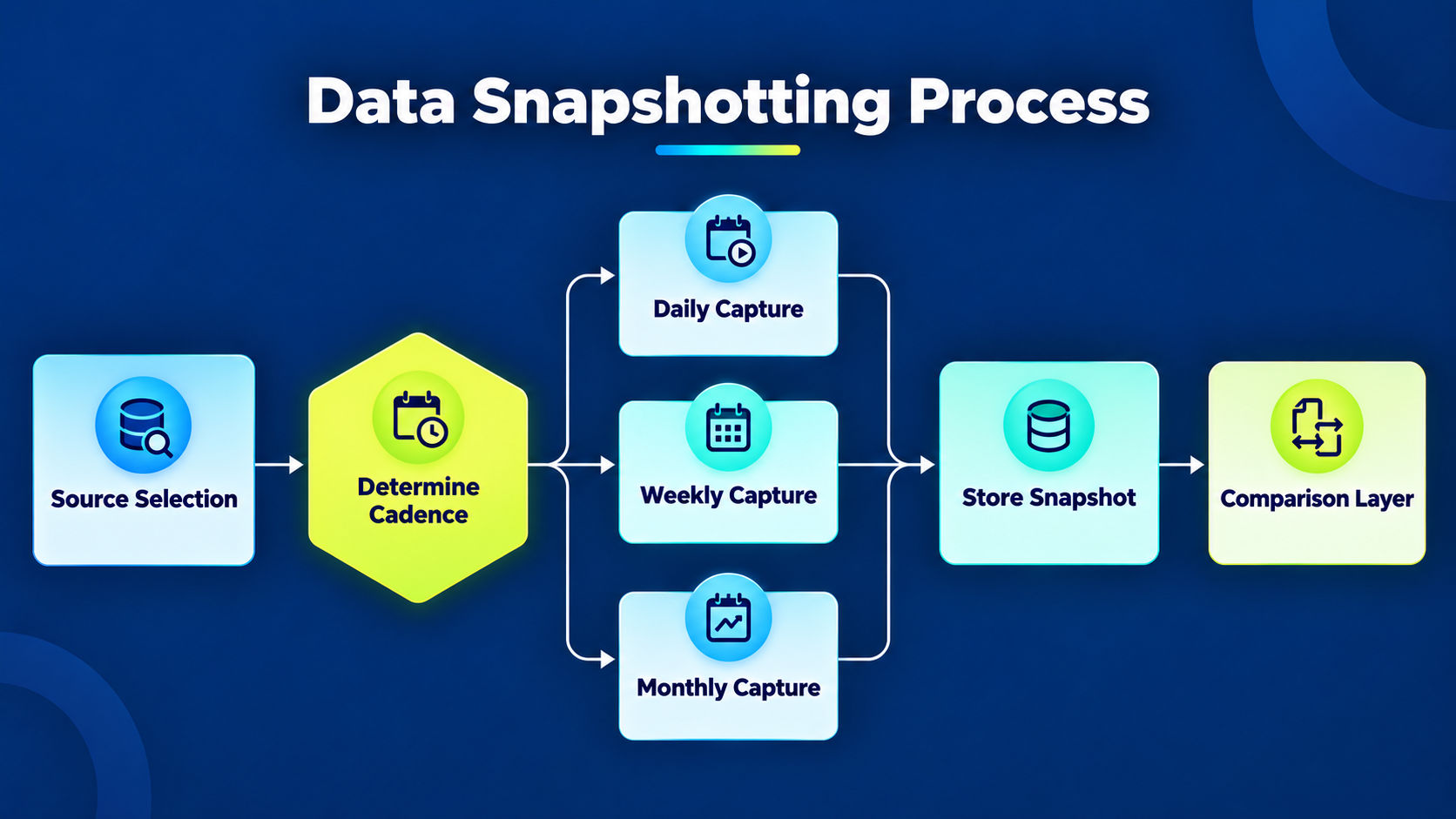
Data snapshotting works by capturing a source dataset on a schedule and storing each capture as a dated, immutable record.
The mechanics are simple. The discipline is in doing it consistently and choosing the right cadence.
A working snapshot process has four parts:
- Source: the live report, CRM object, spreadsheet, or query you want to freeze.
- Cadence: how often you capture. Daily for fast-moving pipeline, weekly for adherence to a standard, monthly for financial state.
- Store: a dated table where each capture lands as its own row set, never overwriting the last.
- Comparison: the layer that reads the dated captures and computes what moved between any two dates.
Cadence is the decision that trips people up. Snapshot too coarsely and you miss the swing that mattered.
A metric can spike and recover between two monthly captures, and the monthly view shows a flat line that hides the whole episode.
Snapshot is all good while you store noise. The right interval matches the speed of the thing you are watching, which is the core idea behind point-in-time analysis for real business decisions.
How long a first capture takes to become useful?
A single snapshot tells you the current state. Trend detection needs at least a handful of captures in sequence, which is why teams start snapshotting before they need the answer, not after.
Why do averages hide the problems snapshots reveal?
Averages hide problems because rolling many locations into one number washes out the outliers, and outliers are usually the early warning. A fleet-wide average can sit comfortably inside target while one location is quietly failing underneath it.
This is the aggregation trap, and it is worse the more distributed your operation is.
Example
Picture a chain of 200 stores. The regional roll-up shows same-store sales up 2%. Healthy. Underneath that average, twelve stores are down double digits and being carried by a strong quarter at the top. The roll-up says the region is within parameters when, in reality, one part of it is melting down.
Snapshots at the location level break the trap in three ways:
- They preserve each location's own trajectory, not just the group mean
- They let you compare a location against its own past, catching a decline that a peer comparison would miss
- They surface the moment a location crosses a threshold, before the quarterly number reflects it
Keeping granular snapshots is necessary. It is not sufficient. If you preserve every location's weekly state and no one has time to read 200 of them every cycle, you have traded a blind average for an unreadable pile.
Codify what your best operators already know.
Scoop captures your operators' tribal knowledge, screens every location automatically, and delivers role-specific action plans. Nobody writes a prompt. The plan just arrives.
- Codified tribal knowledge
- Automatic screening
- Action plans, not dashboards
How do snapshots catch performance drift across locations?
Snapshots catch drift by comparing each location against the standard you set, every cycle, and flagging the moment the numbers start to slide.
Drift is the slow, quiet decay that follows any best practice once it leaves the room where it was decided.
Operators know this pattern well. You push a standard to every location. Everyone agrees to it. Then, as one hospitality operator put it, five days later some things can unravel.
Things unravel. You try to hard code so many things, and you try to put up so many permission levels, but still, things unravel.
A single snapshot cannot see drift. A sequence can.
When you snapshot each location's adherence to a standard week over week, the slide shows up as a trend line bending away from target, not as a single bad number you might dismiss.
That is the difference between descriptive and diagnostic analytics: one tells you the number is down, the other tells you it has been sliding for three weeks and where it started.

What turns a stack of snapshots into a decision?
What turns snapshots into decisions is interpretation. The data tells you what changed. Someone still has to say what it means and what to do next.
At one location, an experienced operator does that in their head. Across 200, that judgment does not scale by looking harder.
This is the interpretation gap. Your systems already show what happened.
The bottleneck is the layer on top: reading each location's snapshot the way your best operator would, deciding which slide is noise and which is the start of a real problem, and doing it everywhere, every cycle.
That work is exactly what does not scale by adding dashboards, and it is why AI investigation has become the interesting question in analytics.
Scoop sits on this layer. It is not a time series database and not a replacement for your BI. It adds the interpretation and action layer on top of the data you already have.
The capture mechanism is deliberately concrete. As the founder describes it: if we took a tape recorder and recorded everything your best operator thought as they looked at their reports, we stick that into the system so it can do that on your behalf, across every location, every cycle.
It turns an analyst who is just trying to keep their head above water into a strategic thinker. You do not lose them. You 10x them.
The result is not another dashboard to open. It is a report that arrives with what changed at each location, why it changed, and options for what to do, so the enterprise BI stack you already run gains an interpretation layer it never had. The snapshots feed it. The judgment runs on top.
Every location diagnosed. Every cycle.
Scoop is AI performance management for distributed businesses. It diagnoses performance at every location, every cycle, and hands every manager a clear action plan.
- Every location, every cycle
- Role-specific action plans
- No prompting required
Where does snapshotting deliver the most value?
Snapshotting delivers the most value anywhere the current state hides a trend, and anywhere a group average hides an individual problem. That describes most distributed and multi-location operations.
The highest-value applications share a pattern:
Sales pipeline:
Snapshot open opportunities daily to see slippage, re-forecasts, and stalled deals that a live report erases.
Multi-location retail:
Snapshot each store against its own history to catch the decline a regional average absorbs. This is the core of retail analytics.
Hospitality:
Snapshot occupancy and rate per property to spot the one asset drifting off standard before the monthly close shows it.
Operational adherence:
Snapshot compliance with a standard week over week to monitor whether the practice you set actually holds.
Catch the store problem before it hits the P\&L.
Scoop screens every store, every cycle, for comp sales, conversion, labor, and inventory issues. Then it sends the action plan straight to the manager who owns the fix.
- Comp sales and conversion
- Labor and inventory
- Every store, every cycle
Frequently asked questions about Data Snapshotting for Precise Time Series Analysis
What is a data snapshot in simple terms?
A data snapshot is a copy of your data captured at a specific point in time, frozen so it does not change when the source updates. It is like a photograph of a dataset on a given day. Comparing snapshots from different dates shows how the data moved, which is the basis of point-in-time analysis.
What is the difference between a snapshot and a backup?
A backup exists to restore data after loss. A snapshot exists to analyze change over time. Backups are about recovery and are rarely queried. Snapshots are captured on a schedule specifically so you can compare them and run historical data analysis. Same underlying idea, opposite purpose.
How often should I take data snapshots?
Match the cadence to the speed of what you are watching. Daily for fast-moving sales pipeline, weekly for adherence to an operational standard, monthly for financial state. Snapshot too coarsely and you miss short swings. Snapshot too finely and you store noise. The right interval is the one that captures the movement you need for trend analysis without drowning in it.
Can I do time series analysis without snapshots?
Only if your source already stores history at consistent intervals, which most business systems do not. CRMs and spreadsheets show the current record and overwrite the last. Snapshotting rebuilds the interval-based history that time series analysis requires, which is why the two go together.
Why do averages miss problems that snapshots catch?
A group average washes out individual outliers. A regional roll-up can sit inside target while one location fails underneath it. Location-level snapshots preserve each unit's own trajectory, so you catch the store or property that is sliding before the aggregate reflects it. This is the difference between descriptive and diagnostic analytics.
How does Scoop use snapshots?
Scoop adds an interpretation and action layer on top of your existing BI, using snapshotted history to screen every location every cycle. It reads each location's trajectory the way an experienced operator would, flags drift against your standards, and delivers a report with what changed, why, and what to do. It does not replace your data warehouse or BI. It reads AI investigation onto the data you already keep.
Get insights like this every week
Analytics, ops strategy, and product updates. No noise.
Keep reading


Book a discovery call
Reach out to start a two-way conversation about your industry, your performance variations across locations, and whether Scoop is the right fit for you.