What Is Diagnostic Analytics?

What Is Diagnostic Analytics?

Your dashboard shows revenue dropped 18%—but can't tell you why. That's where most BI tools fail and where millions in wrong decisions happen. This guide answers what is diagnostic analytics, why it's the missing piece between seeing problems and solving them, and how investigation-grade platforms deliver answers in 45 seconds that traditional tools take days to uncover.

Your revenue dropped 18% last month. You know it happened—your dashboard screams it at you every morning. But here's the question that keeps you up at night: why?

Was it the pricing change in Region 3? The new competitor that launched in September? That shipping delay that affected 2,000 orders? Or something else entirely that you haven't even considered?

This is the moment where most business intelligence tools leave you hanging. They're excellent at telling you what happened. They're terrible at explaining why it happened. And that gap between knowing and understanding? That's costing you millions in missed opportunities and wrong decisions.

Welcome to the world of diagnostic analytics.

What Is Diagnostic Analytics?

Diagnostic analytics is the process of examining your business data to uncover the root causes behind specific outcomes, trends, or anomalies. While descriptive analytics tells you what happened in your operations, diagnostic analytics digs deeper to explain why it happened—making it essential for leaders who need to solve problems, not just observe them.

Here's what makes diagnostic analytics different from the reports you're used to seeing: it doesn't just show you a number went down. It investigates why that number changed by examining patterns across your data, testing multiple hypotheses, and identifying the specific factors that drove the outcome.

Think of it this way: descriptive analytics is like your check engine light turning on. It alerts you to a problem. But diagnostic analytics is the mechanic who pops the hood, runs tests, and tells you exactly which component failed and why.

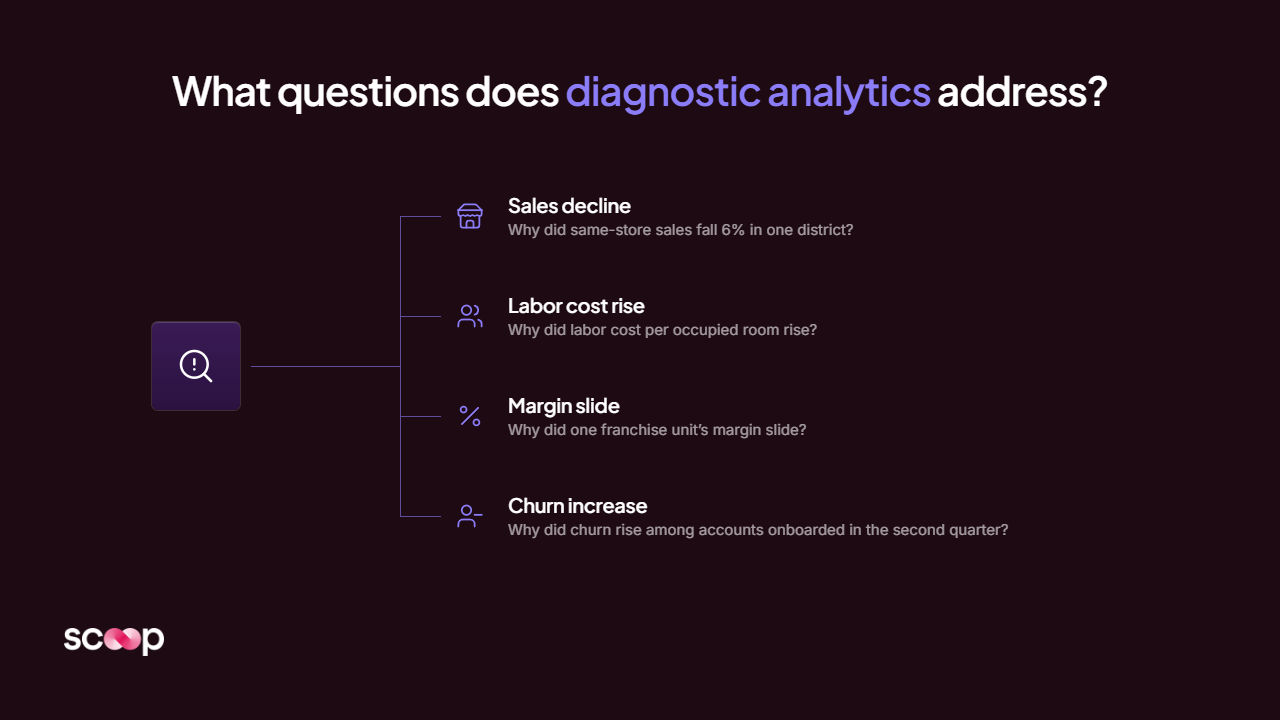
The questions diagnostic analytics helps you answer sound familiar because you probably ask them every week:

  • Why did our customer churn rate spike in Q3?
  • Why are delivery times increasing in the Northeast region?
  • Why did conversion rates drop after our website redesign?
  • Why are certain product lines underperforming while others thrive?
  • Why did our operational costs jump 23% without a corresponding increase in output?

These aren't simple questions. And they don't have simple, single-variable answers. That's the challenge—and the opportunity.


Try It Yourself

                              Ask Scoop Anything        

Chat with Scoop's AI instantly. Ask anything about analytics, ML, and data insights.


No credit card required • Set up in 30 seconds

    Start Your 30-Day Free Trial  

Why Diagnostic Analytics Matters More Than You Think

Let me share something we've seen firsthand across hundreds of operations teams: most business leaders are making million-dollar decisions based on incomplete information.

You're not doing it intentionally. You're working with the tools available to you. But those tools are showing you symptoms, not causes.

Consider this scenario: Your fulfillment costs increased by 15% last quarter. Your finance team flags it. Your operations team investigates. They spend three days pulling reports, comparing metrics, and building spreadsheets. Finally, they present their findings: "Costs are up across all regions, particularly in shipping."

Okay. But why? Was it fuel surcharges? Package weight increases? A shift in delivery zones? More expedited shipping requests? A combination of all four?

Without diagnostic analytics, you're left testing solutions based on educated guesses. You might negotiate better fuel rates when the real issue is that your team is using expedited shipping for non-urgent orders because of a confusing policy. Six months and several failed initiatives later, you're still bleeding cash.

Here's the truth: every day you spend without understanding the "why" is a day you're treating symptoms instead of curing diseases.

The cost adds up faster than you think:

  • 3-5 days per investigation for your analytics team
  • Thousands of dollars in analyst time for each question
  • Weeks or months implementing solutions that don't address root causes
  • Millions in opportunity cost from problems that persist because you're solving the wrong things

And that's just the measurable cost. The unmeasurable cost? The strategic opportunities you miss because you're busy fighting fires with the wrong equipment.

Descriptive vs Diagnostic Analytics: What's the Difference?

This is where most people get confused. They think they're doing diagnostic analytics because their BI tool has drill-down capabilities. But there's a fundamental difference between these two approaches.

Aspect Descriptive Analytics Diagnostic Analytics
Core Question What happened? Why did it happen?
Function Summarizes historical data Investigates root causes
Output Dashboards, reports, KPIs Root cause analysis, pattern identification
Techniques Aggregation, summarization, visualization Correlation analysis, segmentation, hypothesis testing
User Action Monitor and observe Investigate and solve
Time Focus Historical facts Historical relationships
Example "Revenue dropped 18% in March" "Revenue dropped because mobile checkout errors increased 340%"

Let me make this concrete with a real example.

Descriptive analytics tells you:

  • Customer churn increased from 5% to 8% this quarter
  • 47 customers canceled their subscriptions
  • Most cancellations happened in weeks 8-10
  • Enterprise segment had the highest churn rate

That's valuable information. You know something went wrong. But you still don't know what to fix.

Diagnostic analytics tells you:

  • Churn increased specifically among customers who had 3+ support tickets in their first 30 days
  • 89% of churned customers never completed the onboarding workflow
  • The correlation between first-month support burden and churn is 0.73 (statistically significant)
  • Enterprise customers churned after experiencing an average 4.2-day delay in getting technical questions answered

Now you can act. You know you need to fix onboarding completion rates and first-month support response times—specifically for enterprise customers.

See the difference? One tells you where to look. The other tells you what to fix.

How Does Diagnostic Analytics Actually Work?

Diagnostic analytics follows a systematic investigation process. Think of it like a detective solving a case—you start with evidence, form hypotheses, test them, and arrive at conclusions.

Here's how it works in practice:

1. Identify the Anomaly or Question

You start by noticing something unusual in your data or asking a specific business question. Maybe a metric deviated from its normal range. Maybe you're trying to understand what drives a particular outcome.

Example: "Why did our warehouse efficiency score drop from 94% to 81% in January?"

2. Gather Relevant Data from Multiple Sources

This is where diagnostic analytics gets powerful. You don't just look at one dataset. You pull information from every system that might be relevant: your WMS, ERP, HR systems, maintenance logs, weather data, even supplier databases.

The magic happens when you connect data that usually lives in silos. Modern platforms like Scoop Analytics can automatically connect to 100+ data sources—from your CRM and fulfillment systems to your spreadsheets and databases—without requiring IT setup. This means you're working with complete information, not just whatever data happens to live in one system.

3. Segment and Filter to Find Patterns

Now you break down your data by different dimensions: by warehouse location, by shift, by product category, by employee tenure, by day of week. You're looking for where the problem is concentrated.

In our warehouse example, segmentation might reveal:

  • The efficiency drop only affected the night shift (huge clue)
  • It started on January 3rd (specific date = specific cause)
  • It was isolated to the fulfillment area, not receiving (narrows the scope)
  • New hires were 3× more likely to make errors (another pattern)

4. Test Hypotheses and Identify Correlations

Here's where most tools fail—and where investigation-grade diagnostic analytics shines. You need to test multiple hypotheses simultaneously:

  • Did staffing changes correlate with the efficiency drop?
  • Did a system update affect workflow on January 3rd?
  • Did product mix change (more complex items)?
  • Did we receive unusually high order volume?
  • Were equipment maintenance schedules altered?

Testing these one by one takes days. Testing them simultaneously with the right tools? Minutes.

This is where the fundamental architecture matters. Traditional BI tools can only answer one question at a time—you run a query, get an answer, run another query. But investigation-grade diagnostic analytics platforms test 8-10 hypotheses in parallel, examining relationships across all your data simultaneously. It's the difference between interrogating one witness at a time versus having a team of detectives working the case together.

5. Validate and Quantify the Root Cause

Once you identify likely causes, you validate them and measure their impact. This step is crucial because it tells you what to prioritize.

The answer in our example: A new WMS update on January 2nd changed the pick path algorithm. The night shift (which had more new employees) struggled to adapt because they received less training. The impact: 1,247 extra labor hours in January, costing $31,175.

Now you know exactly what to fix: roll back the algorithm change or provide additional training. You can quantify the ROI of each solution. You can act with confidence.

What Are the Key Techniques in Diagnostic Analytics?

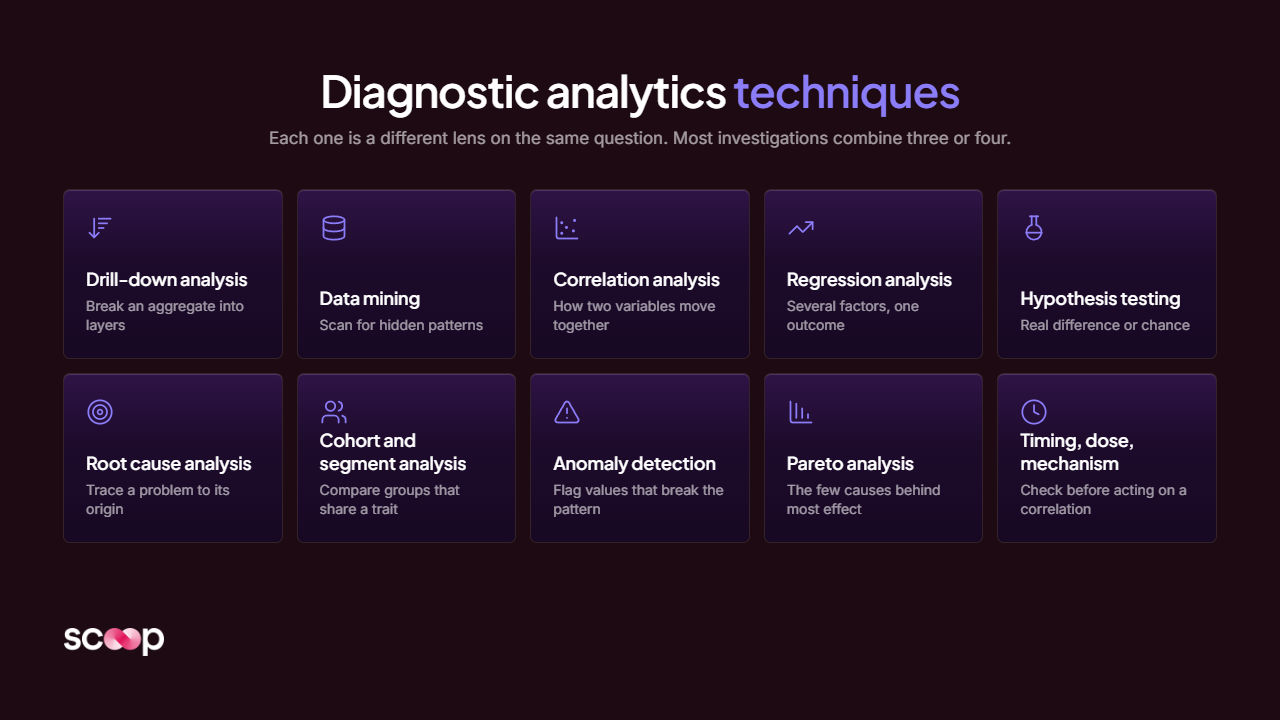
Let me walk you through the most powerful techniques that make diagnostic analytics work. You don't need to be a statistician to understand these—think of them as different lenses for examining your data.

Drill-Down Analysis

This is the most basic technique, but it's where most teams stop. You start with a high-level metric and progressively break it down into finer detail.

How it works: If revenue is down, you drill down by region. Then by product. Then by sales channel. Then by customer segment. Each layer reveals more detail.

The limitation: You're still manually navigating one path at a time. If the real issue involves the interaction between region and product category and sales channel, traditional drill-down makes it hard to see.

Here's what makes this frustrating: you might drill down by region and find nothing unusual. Then by product and find nothing unusual. Then by sales channel and see a small decline. But you miss that Enterprise customers in the Northeast buying through partners have a 40% decline—because you never examined that specific combination.

Correlation Analysis

This technique identifies relationships between variables. When X changes, does Y tend to change too? And how strong is that relationship?

Real example: A logistics company discovered a 0.82 correlation between driver tenure and on-time delivery rates. Drivers with less than 6 months experience were causing 73% of delays. The fix? Enhanced mentoring for new drivers, which improved on-time rates by 19%.

Critical caveat: Correlation doesn't mean causation. Just because two things move together doesn't mean one causes the other. (Ice cream sales and drowning deaths both increase in summer, but ice cream doesn't cause drowning—heat causes both.)

The best diagnostic analytics platforms show you correlation strength and statistical significance, so you know which relationships are meaningful versus which are coincidental. Look for correlations above 0.6-0.7 with p-values below 0.05 if you want to get technical—or better yet, use tools that simply tell you "strong relationship" or "weak relationship" in plain English.

Root Cause Analysis

This is where you work backward from an effect to find its ultimate cause. It often reveals that what you thought was the problem is actually just a symptom of a deeper issue.

The "5 Whys" technique in action:

  1. Why did the shipment arrive late? → The truck broke down
  2. Why did the truck break down? → The alternator failed
  3. Why did the alternator fail? → It exceeded its service lifespan
  4. Why did it exceed its lifespan? → Maintenance was skipped
  5. Why was maintenance skipped? → The maintenance schedule system didn't send alerts

The root cause? A software configuration issue, not a vehicle problem.

In modern diagnostic analytics, this process happens automatically. The system examines chains of events and dependencies to identify the originating cause, not just the proximate cause. You skip the manual "why" questions and get straight to the answer.

Data Segmentation and Cohort Analysis

This technique divides your data into meaningful groups to spot patterns that aren't visible in aggregate numbers.

Example: An operations director was puzzled why productivity metrics showed steady improvement, but customer satisfaction was declining. Segmentation revealed the answer: productivity was up for experienced employees but down 31% for employees hired in the last 6 months. The company was growing fast, and new hires weren't getting adequate training. Aggregate numbers hid a looming crisis.

This is where having diagnostic analytics tools that understand business context becomes critical. You could segment by dozens of dimensions—hire date, department, manager, location, tenure, shift, day of week. Without smart segmentation, you're drowning in possibilities. The right platform automatically identifies which segments matter for the question you're asking.

Multi-Hypothesis Investigation

This is the technique that separates traditional diagnostic analytics from what we call investigation-grade diagnostic analytics. Instead of testing one hypothesis at a time (the manual approach), you test multiple hypotheses simultaneously.

Traditional approach:

  • Test hypothesis 1: Did pricing changes cause the revenue drop? (Takes 2 hours)
  • No? Test hypothesis 2: Did competitor activity cause it? (Takes 2 hours)
  • No? Test hypothesis 3: Did sales team changes cause it? (Takes 2 hours)
  • Keep going until you find the answer (or give up)

Investigation-grade approach:

  • Test all relevant hypotheses simultaneously (Takes 45 seconds)
  • Get results ranked by impact and confidence
  • See which factors are primary causes vs. contributing factors
  • Understand interactions between multiple variables

This is how platforms like Scoop Analytics deliver answers in under a minute that would take traditional tools days to uncover. When you ask "Why did revenue drop?", Scoop automatically investigates pricing effects, competitor activity, sales performance, customer behavior changes, seasonal patterns, product mix shifts, and regional variations—all at once. Then it synthesizes the findings: "Revenue dropped primarily due to mobile checkout errors (67% of impact) and secondarily due to increased competition in the Northeast region (23% of impact)."

You get complete answers, not partial ones.

Pattern Recognition and Anomaly Detection

Advanced diagnostic analytics uses algorithms to identify unusual patterns that human analysts might miss. This is especially valuable when you're dealing with dozens or hundreds of variables.

Have you ever looked at a report and everything seemed fine, only to discover later that there was a significant issue hiding in a specific subset of your data? That's what pattern recognition prevents.

Real example: A subscription business was monitoring churn rates that looked normal at the aggregate level (5.2% monthly). But pattern recognition algorithms detected an unusual cluster: customers who signed up through a specific marketing campaign, in a specific geographic region, during a specific two-week period had a 19% churn rate. Manual analysis would have missed this entirely because each dimension looked normal individually.

The pattern? A localized ad campaign had attracted price-sensitive customers who churned immediately after the promotional period ended. The fix: change targeting criteria for that region to attract more qualified leads.

Real-World Diagnostic Analytics Examples for Operations Leaders

Theory is useful. But let's get practical. Here are scenarios that operations leaders face constantly—and how diagnostic analytics solves them.

Example 1: The Mystery of Rising Customer Acquisition Costs

The situation: A B2B SaaS company saw customer acquisition costs (CAC) increase from $4,200 to $7,300 over six months. The marketing team was baffled. Ad spend hadn't changed dramatically. Traffic was steady.

The traditional diagnostic investigation would look like this:

  • Week 1: Analyst pulls ad spend data, builds reports, compares to prior period
  • Week 2: Team examines conversion rates by channel
  • Week 3: Finance analyzes deal velocity and sales cycle data
  • Week 4: Everyone debates hypotheses in meetings

What actually happened with investigation-grade diagnostic analytics:

The operations director asked in Slack: "@Scoop why did CAC increase from $4,200 to $7,300?"

In 45 seconds, Scoop investigated multiple hypotheses simultaneously:

  • Ad spend by channel (no significant change)
  • Traffic volume and quality (steady)
  • Conversion rates at each funnel stage (declining in paid channels)
  • Deal velocity by acquisition source (major difference found here)
  • Sales resource allocation (key driver identified)
  • Customer quality metrics by source (LTV analysis)

The discovery: Organic search traffic was flat, but paid search had increased 40%. However, paid search leads took 3× longer to close and required 2× more sales touches. Sales cycle length had increased from 42 days to 67 days, meaning more sales resources per deal—the real driver of CAC increases.

But here's what made the difference: Scoop didn't just identify the problem. It quantified the impact and provided specific recommendations: "Shifting 30% of budget from paid search to organic content creation could reduce CAC to $5,400 within two quarters, preventing $340K in annual waste."

The fix: The team shifted budget back to organic content creation and demand generation. CAC dropped to $5,100 within two quarters—even better than projected.

The lesson: The obvious suspect (ad costs) wasn't the culprit. The real issue was conversion efficiency by channel—something only diagnostic analytics revealed. And having the answer in 45 seconds instead of 4 weeks meant they saved thousands of dollars every day they would have otherwise spent waiting for manual analysis.

Example 2: Inventory Mystery Solved in 45 Seconds

The situation: A retail operations leader noticed that stockout rates had doubled in three months, but inventory levels were actually higher than normal. How could they have more inventory but more stockouts?

Traditional approach: Days of analysis comparing SKU data, reviewing ordering patterns, examining sales trends by category. The analyst team would build pivot tables, create visualizations, run reports, and eventually narrow down the cause through elimination.

Investigation-grade diagnostic analytics approach: The operations leader asked a natural language question: "Why are stockout rates increasing when inventory levels are up?"

The system automatically tested eight hypotheses simultaneously:

  • Demand pattern changes by category
  • Warehouse allocation errors
  • Forecasting accuracy by product line
  • Supplier delivery reliability
  • Regional demand shifts
  • SKU proliferation impact
  • Seasonal pattern changes
  • Demand variability increases

The answer (in 45 seconds): The company had added 340 new SKUs in Q3 to meet customer variety demands. But inventory was still allocated using the old model. They had plenty of slow-moving SKUs (22% of inventory gathering dust) and constant stockouts of fast-movers (causing 73% of the stockout incidents).

The platform even identified the specific reallocation: move $1.2M from slow-moving SKUs in categories A, C, and F to fast-movers in categories B, D, and E. It provided the exact SKU-level recommendations for the inventory team to execute.

ROI: The reallocation prevented an estimated $430K in lost sales over the next quarter. And it was implemented within days instead of months because the analysis was complete before the first meeting even started.

This is the power of investigation that tests multiple hypotheses at once. Traditional drill-down analysis might have found the SKU proliferation eventually—but only after investigating (and eliminating) seven other theories first.

Example 3: The Call Center Efficiency Paradox

The situation: Average handle time (AHT) decreased by 22% after implementing new scripts and workflows. The operations team celebrated. But customer satisfaction scores dropped by 15%.

How could efficiency improve while satisfaction declined?

The diagnostic process revealed:

  • Agents were closing tickets faster by providing scripted responses
  • But first-call resolution (FCR) dropped from 79% to 61%
  • Customers had to call back 2-3 times to actually solve their problems
  • Total customer effort increased despite lower AHT

The pattern: The new scripts optimized for the wrong metric. They made individual calls shorter but made customer problems take longer to resolve.

What made this investigation successful was the ability to connect data from three different systems: the call center software (AHT data), the ticketing system (repeat contact data), and the customer satisfaction survey tool (CSAT scores). Most teams would analyze each system separately and miss the relationship between them.

The fix: Redesigned scripts to prioritize FCR over AHT. Individual calls became slightly longer (AHT increased to 6.2 minutes from 5.1 minutes), but overall customer satisfaction improved by 28% and total call volume decreased by 19% (fewer repeat calls).

The insight: Sometimes what looks like improvement in one metric is actually making the overall system worse. Diagnostic analytics helps you see the complete picture—but only if your platform can connect data across silos. This is why having automatic data integration matters. If connecting your call center, ticketing, and survey data requires a three-month IT project, you'll never do this kind of cross-system diagnostic analysis.

Platforms like Scoop Analytics handle this automatically through 100+ native connectors that bring data together without IT involvement. You ask the question, and the platform investigates across all relevant systems—even if those systems have never talked to each other before.

Example 4: The Spreadsheet That Saved $2.3M

The situation: A manufacturing operations team was drowning in data exports. Every analysis started the same way: export data from their ERP, import it into Excel, spend hours cleaning and transforming it with VLOOKUP and SUMIF formulas, then finally analyze it.

The problem? They were limited by Excel's 1 million row limit. Their production data exceeded that within 3-4 weeks, so they could only analyze recent data or small samples. They were missing patterns that only appeared when examining longer time horizons.

The breakthrough: They discovered they could use their existing Excel formula knowledge—VLOOKUP, INDEX/MATCH, SUMIFS, all the formulas they'd spent years mastering—but apply those formulas to massive datasets. Scoop's spreadsheet calculation engine let them process millions of rows using the same familiar formulas, just at enterprise scale.

An operations analyst asked: "What's driving the 23% increase in defect rates over the past 6 months?"

Using spreadsheet-style transformations (the same VLOOKUP logic they'd always used, just on 8 million rows of production data), the platform identified that defect rates correlated with a specific supplier's materials—but only for products manufactured on Line 3, and only during the night shift.

The pattern was invisible when analyzing one month at a time in Excel. It only became obvious when examining 6 months of data across all production lines, shifts, and suppliers simultaneously.

The root cause: Line 3's equipment calibration was slightly off, which didn't matter for most materials but caused defects with this specific supplier's material tolerances. Night shift operators didn't notice because they were less experienced at detecting the subtle quality issues during visual inspection.

The fix: Recalibrate Line 3 equipment and add quality check protocols for night shift. Defect rates dropped from 4.7% to 1.8%, saving an estimated $2.3M annually in waste and rework.

The lesson: Your team already knows how to do sophisticated data transformation—they do it in Excel every day. The problem is Excel can't handle the scale your business operates at. Being able to apply spreadsheet logic to enterprise-scale data unlocks analysis that was previously impossible. And because the analyst was using formulas they already knew, they got answers in 20 minutes instead of the 2-3 days it would have taken to learn SQL or Python.

The Gap Traditional BI Tools Leave (And What to Look For Instead)

Here's something most vendors won't tell you: when they say their platform does "diagnostic analytics," what they really mean is that you can manually drill down into your data and build custom reports.

That's not diagnostic analytics. That's just... more work for you.

Let me show you what I mean.

Traditional BI platforms approach diagnostic analytics like this:

  1. You notice a problem in a dashboard
  2. You manually segment the data by one dimension
  3. You build a new report
  4. You test one hypothesis
  5. If that's not the answer, you start over with a different hypothesis
  6. You repeat this 5-10 times
  7. Three days later, you might find the answer

What actually happens: Most teams give up after testing 2-3 hypotheses because it's too time-consuming. They make a decision based on incomplete information.

This is why 70% of business leaders say they lack confidence in their data-driven decisions. It's not because they don't have data. It's because their tools make diagnostic analytics too slow and too manual.

I've watched this play out dozens of times. An operations leader spots an anomaly on Monday. By Tuesday, they've assigned an analyst to investigate. Wednesday, the analyst is still gathering data from different systems. Thursday, they're building reports and testing the first hypothesis. Friday, that hypothesis doesn't pan out, so they start investigating a second one. The following Tuesday, they present findings—which might be right, or might be the third-best explanation because they ran out of time to test everything.

Two weeks have passed. The problem has cost the company thousands or tens of thousands of dollars. And you're still not certain you found the real root cause.

What Investigation-Grade Diagnostic Analytics Looks Like

The next generation of diagnostic analytics—what we call investigation-grade—automates the entire process. Instead of testing hypotheses one at a time, it tests multiple hypotheses simultaneously and synthesizes the findings.

Here's what that looks like in practice:

You ask: "Why did our enterprise contract renewal rate drop from 94% to 81%?"

Behind the scenes (in 45 seconds), the platform:

  • Tests 8-12 hypotheses automatically
  • Examines customer health scores across 50+ signals
  • Analyzes product usage patterns
  • Correlates support ticket patterns with churn
  • Segments by contract size, industry, and customer tenure
  • Identifies statistically significant patterns
  • Quantifies the impact of each factor
  • Ranks causes by their contribution to the outcome

What you receive: "Enterprise renewal rate declined due to three primary factors:

  1. Support response time degradation (89% confidence): Customers with >48hr initial response times churned at 3.2× the rate of faster-response customers. Impact: 12 of 17 churned accounts. This factor explains 67% of the renewal rate decline.
  2. Feature adoption stalls (84% confidence): Customers who didn't adopt the new analytics module within 60 days showed 67% higher churn risk. Impact: 9 of 17 churned accounts. This factor explains 31% of the decline (overlaps with factor 1 for some accounts).
  3. Champion turnover (76% confidence): Accounts where the primary contact left the company within 12 months showed 2.1× higher churn. Impact: 7 of 17 churned accounts. This factor explains 22% of the decline.

Recommended actions (ranked by projected impact):

  • Implement 24-hour SLA for enterprise support (estimated retention impact: 8-10 accounts saved = $1.2M ARR)
  • Launch proactive onboarding for analytics module (estimated impact: 5-7 accounts saved = $750K ARR)
  • Establish quarterly executive relationship reviews (estimated impact: 4-6 accounts saved = $600K ARR)"

Notice what's different here:

  • Multiple hypotheses tested simultaneously, not one at a time
  • Confidence levels provided so you know which findings are most reliable
  • Impact quantified so you can prioritize solutions
  • Overlaps identified (some accounts had multiple risk factors)
  • Specific actions recommended with projected ROI

This is the difference between tools that enable diagnostic analytics and tools that perform diagnostic analytics.

Traditional BI tools give you the components—data access, visualization, filters, drill-downs—and say "good luck, figure it out yourself." Investigation-grade platforms like Scoop Analytics do the actual investigation work, leveraging machine learning to test hypotheses you might not have even considered.

The technical difference? Scoop uses a three-layer AI architecture:

Layer 1 (invisible to you): Automatically prepares your data—handles missing values, identifies outliers, creates meaningful segments, engineers relevant features. This is the data science grunt work that usually takes analysts hours or days.

Layer 2 (the actual intelligence): Runs sophisticated ML algorithms—J48 decision trees that can be 800+ nodes deep, rule-learning algorithms that generate if-then statements, clustering algorithms that find natural groupings. These are real machine learning models (using the Weka library that powers academic research), not simple statistics.

Layer 3 (what you actually see): Translates the complex ML output into clear business language. You don't see an 800-node decision tree that would take a PhD to interpret. You see: "High-risk customers have 3+ support tickets in their first 30 days and haven't completed onboarding."

That three-layer architecture is why investigation-grade diagnostic analytics can deliver answers in 45 seconds that would take traditional approaches days to uncover. You get PhD-level data science explained in language a business operations leader can immediately act on.

How to Implement Diagnostic Analytics in Your Organization (Without Hiring a Data Science Team)

You don't need a PhD in statistics to implement diagnostic analytics. But you do need the right approach. Here's how to get started:

Step 1: Identify Your Most Expensive Questions

What questions, if answered, would have the biggest impact on your business? Make a list of the top 10 "why" questions that keep coming up in leadership meetings:

  • Why are costs increasing in Region X?
  • Why are certain products underperforming?
  • Why is customer satisfaction declining despite improvements?
  • Why are project timelines slipping?
  • Why is employee turnover higher in Department Y?
  • Why did our NPS drop in Q3?
  • Why are some sales reps outperforming others by 3×?
  • Why did our on-time delivery rate decline?

These are your diagnostic analytics priorities. Start with the questions that have the highest financial impact if answered correctly.

Pro tip: Frame these as specific, measurable questions. "Why are things bad?" is too vague. "Why did our customer churn rate increase from 5% to 8% between Q1 and Q2?" is specific enough to investigate.

Step 2: Assess Your Data Readiness

Diagnostic analytics requires three things:

  1. Historical data (at least 3-6 months of consistent metrics)
  2. Connected data (from multiple systems that can be analyzed together)
  3. Clean data (accurate, complete, and properly structured)

You don't need perfect data. But you need data that's good enough to identify patterns. Most organizations already have this—it's just trapped in silos.

Here's a quick readiness test:

  • Can you export data from your key operational systems? (Yes = good start)
  • Does that data have consistent formats over time? (Yes = you're ready)
  • Can you connect related records across systems? (Yes = you're ahead of most)

If you answered yes to the first two, you're ready to start. The third one is nice to have but not essential—modern platforms can handle data integration for you.

Step 3: Choose Tools That Match Your Team's Skills

This is critical. If you choose tools that require SQL knowledge or statistical expertise, your business leaders won't use them. Look for platforms that:

  • Allow natural language questions ("Why did revenue drop?" not "SELECT SUM(revenue) FROM...")
  • Automatically test multiple hypotheses (investigation, not just query)
  • Provide explanations in business terms (not statistical jargon like "p-values" and "R-squared")
  • Show confidence levels with findings ("89% confidence" not "p<0.05")
  • Quantify business impact ("$430K in potential savings" not just "statistically significant")
  • Integrate with your existing data sources (100+ connectors, not custom IT projects)
  • Work where your team already works (Slack, spreadsheets, not just another portal to learn)

The test: Can your operations manager use it without calling IT? If not, it's too complex.

Here's why this matters: we've seen companies invest $300K+ in advanced analytics platforms that sit unused because they require technical skills the business users don't have. The "democratization" never happens because there's a learning curve no one has time for.

In contrast, platforms designed for business users—like Scoop Analytics—let people ask questions in plain English in Slack: "@Scoop why did fulfillment costs increase?" The investigation happens automatically, and the answer comes back in 45 seconds. No training required. No SQL to learn. No dashboards to build.

The adoption rate difference is dramatic: 90%+ of users actively using the platform within the first week versus the typical 15-20% adoption for traditional BI tools.

Step 4: Start with Quick Wins

Don't try to transform your entire analytics practice overnight. Pick one high-impact question, apply diagnostic analytics, solve it, and show the ROI. Then scale.

We've seen this pattern repeatedly: organizations that start with a focused pilot see results in weeks, gain executive buy-in, and then expand across departments.

A proven approach:

Week 1: Choose your highest-impact diagnostic question. Connect your data sources. Ask the question.

Week 2: Validate the findings. Implement the recommended fix. Measure the baseline before the fix.

Week 3-4: Track the improvement. Quantify the business impact in dollars.

Week 5: Present the ROI to leadership: "We identified the root cause of [problem] in 45 seconds instead of 3 days, implemented a fix, and saved $X. Here are 5 more problems we could solve the same way."

This bottom-up approach works better than top-down mandates. When people see the tool actually solving their real problems in minutes, adoption spreads organically.

Example quick win: An operations leader at a logistics company started with one question: "Why are our same-day delivery rates declining?" The investigation revealed that a routing algorithm update was sending drivers to addresses in a suboptimal sequence. The fix took 2 hours to implement. Same-day delivery rates improved from 87% to 94% within a week. Total time from question to solved: 4 hours. ROI: $89K in prevented penalties over the next quarter.

That's the kind of quick win that gets budget approved for broader deployment.

Step 5: Build Investigation into Your Workflow

The goal isn't just to answer questions when problems arise. The goal is to continuously investigate and optimize. Schedule regular diagnostic reviews:

Weekly: Key metrics with automated anomaly detection. Set up alerts for unusual patterns so you catch issues early.

Monthly: Deep dives into strategic priorities. Block 30 minutes to investigate your most important operational questions.

Quarterly: Comprehensive business health diagnostics. Run investigations across all major metrics to find optimization opportunities you might be missing.

Make investigation a habit, not a fire drill.

One customer success leader we work with has a standing Slack channel called #weekly-diagnostics. Every Monday morning, the team shares one diagnostic question they investigated and what they learned. It takes 5 minutes per person. But over a year, that channel has generated 43 process improvements and saved an estimated $2.8M.

The cultural shift is subtle but powerful: teams start asking "why" by default instead of just accepting what the numbers show.

Common Challenges in Diagnostic Analytics (And How to Overcome Them)

Let's talk about what actually goes wrong when organizations try to implement diagnostic analytics—and how to avoid these pitfalls.

Challenge 1: Mistaking Correlation for Causation

Just because two things happen together doesn't mean one caused the other. This is the most common analytical mistake we see.

Example: A company discovered that customers who attended webinars had 40% higher retention rates. They invested heavily in webinar marketing, expecting retention to improve. It didn't.

The real story: Customers who were already highly engaged attended webinars. Attending the webinar didn't cause higher retention—high engagement caused both webinar attendance and better retention.

How to avoid it: Always ask "Could there be a third factor driving both?" Look for evidence of causation beyond correlation—time sequences, controlled experiments, or logical mechanisms.

The best diagnostic analytics platforms help you spot this by showing you:

  • Temporal sequence: Did the suspected cause happen before the effect?
  • Dose-response relationship: Does more of the cause create more of the effect?
  • Logical mechanism: Is there a plausible explanation for how X causes Y?

When Scoop identifies a correlation, it also checks these factors and flags findings where causation is uncertain. You'll see notes like: "Strong correlation (0.78) but causation unclear—both variables may be driven by a third factor."

Challenge 2: Analysis Paralysis

With so many variables to examine, it's easy to get lost in endless investigation without ever taking action.

The trap: You keep drilling down, segmenting, and analyzing because you want to be absolutely certain before making a decision.

The reality: Waiting for perfect information means you miss the window to act. Speed matters more than perfection.

How to avoid it: Set decision deadlines. Use confidence levels to guide action—if you're 75-80% confident, that's usually enough to proceed with a reversible decision.

Think of it this way: if you have a 75% chance of being right and the cost of being wrong is low (you can undo the change), act immediately. If you have a 90% chance of being right but the cost of being wrong is 

catastrophic, keep investigating.

A useful framework:

Confidence Level Decision Type Action
50-60% Low stakes, reversible Act and monitor
60-75% Medium stakes Act with contingency plan
75-85% High stakes, reversible Act confidently
85%+ High stakes, irreversible Proceed
<50% Any stakes Investigate further

Most business decisions are reversible. If you implement a solution and it doesn't work, you can change course. The cost of waiting is often higher than the cost of getting it slightly wrong.

Challenge 3: Data Quality Issues Derailing Investigation

Garbage in, garbage out. If your underlying data has quality issues, diagnostic analytics will lead you to wrong conclusions.

Warning signs:

  • Missing data for key time periods
  • Inconsistent definitions across systems ("customer" means different things in your CRM vs. your billing system)
  • Manual data entry errors (50% of spreadsheets contain errors, according to research)
  • System integration gaps (your e-commerce platform doesn't talk to your inventory system)

How to address it: Start with data quality assessment. Clean your most critical data sources first. Don't let the pursuit of perfect data prevent you from starting—80% clean data is better than waiting indefinitely for 100% perfect data.

Here's the practical approach: identify your top 3-5 data sources for the diagnostic questions that matter most. Audit those sources specifically. Fix the obvious issues (duplicates, formatting problems, missing required fields). Then start investigating.

You'll discover additional data quality issues as you go—that's normal. Modern platforms like Scoop Analytics actually help you find data quality issues through the investigation process. If Scoop identifies an unexpected pattern, it might be a real business insight or it might be a data quality problem. The platform flags anomalies that could be data issues: "Note: 12% of records have missing Region values, which could affect this analysis."

This is another advantage of investigation-grade diagnostic analytics over manual approaches. When you're manually building reports, you might not notice that 12% of your data is incomplete. The automated investigation catches it for you.

Challenge 4: Asking the Wrong Questions

Sometimes the question you're asking isn't actually the question you need answered.

Example: "Why are sales declining in the Northeast?" might be the wrong question if the real issue is that your total addressable market in the Northeast has shifted, and you should be asking "Should we reallocate resources to the Southwest where our TAM is growing?"

How to avoid it: Before diving into analysis, step back and ask: "What decision will this analysis inform?" If you can't articulate a clear decision, refine your question.

Use this framework:

  1. What decision are we trying to make?
  2. What would we do if we knew X was the cause?
  3. What would we do if we knew Y was the cause?
  4. Are those different actions? (If not, maybe you don't need to investigate—just act)

Sometimes the fastest path to results is testing solutions, not investigating causes. If two potential fixes both cost $5K and take a week to implement, maybe just try them both instead of spending three weeks figuring out which one to try first.

Challenge 5: Ignoring Practical Constraints

You might discover that the #1 driver of customer satisfaction is having dedicated account managers for every customer. Great insight. But if your business model can't support that cost structure, the insight isn't actionable.

The fix: Include feasibility in your analysis. Rank solutions by both impact and implementation difficulty. Sometimes the second-best solution that you can actually execute is better than the optimal solution that's impossible.

A useful 2×2 matrix:

High Impact Low Impact
Easy to Implement
PRIORITY
DO THESE FIRST
Highest ROI opportunities. Start here for immediate wins.
Quick wins if time permits
Low effort, low return. Do if resources available.
Hard to Implement
Strategic initiatives
Plan carefully. High impact worth the effort.
Ignore these
High effort, low return. Not worth pursuing.

Pro Tip: A 31% improvement you can achieve today is better than a 67% improvement you can't implement for six months.

When diagnostic analytics identifies root causes, immediately ask: "Can we actually fix this?" If the answer is no, look for the next-best lever you can pull.

This is where having quantified impact matters. If the primary cause explains 67% of the problem but is impossible to fix, and the secondary cause explains 31% of the problem but is easy to fix, fix the secondary cause. A 31% improvement you can achieve is better than a 67% improvement you can't.

Good diagnostic analytics platforms help you think through this by providing not just root causes, but ranked recommendations that consider both impact and feasibility. Scoop's AI explanation layer does this automatically: "While [primary factor] has the largest impact, [secondary factor] may be easier to address and still provides significant benefit."

What Good Diagnostic Analytics Actually Costs (And What It Saves)

Let's talk about the economics, because this matters to operations leaders making budget decisions.

Traditional BI platforms:

  • $800-1,500 per user/year in licensing
  • 2-4 FTE data analysts ($180K-$320K annually)
  • 6-month implementation timeline
  • Manual diagnostic analysis: 2-5 days per investigation
  • IT resources for integration and maintenance: 0.5-1 FTE ($90K-$160K)
  • Training costs: $50K-$100K annually

Total cost for 200 users: $300K-$600K annually

Investigation-grade diagnostic analytics:

  • $299 per user/year for platforms with automation
  • Minimal analyst resources needed (0.5-1 FTE) because business users self-serve
  • Days to first insights (not months)
  • Automated investigation: 30-90 seconds per analysis
  • Zero IT resources required (100+ native connectors, automatic setup)
  • Zero training costs (natural language interface, works in Slack)

Total cost for 200 users: $60K annually

That's a 5-10× cost reduction on the platform and personnel side. But here's the real ROI calculation that operations leaders care about:

Time Savings

If your operations team asks 20 diagnostic questions per month (a conservative estimate for most companies):

  • Traditional approach: 40-100 days of analyst time per month = $32K-$80K in monthly labor cost
  • Investigation-grade approach: <1 day of analyst time = $800-$1,600 in monthly cost

That's a 40-50× cost reduction just in analysis time. Even if you only ask 10 questions per month, you're still saving $15K-$40K monthly in labor costs alone.

But wait—it gets better. The real ROI comes from faster decision-making.

Opportunity Cost of Speed

Consider these real scenarios:

Scenario 1: Catching a fulfillment issue one week earlier

  • Problem identified: Warehouse picking errors increasing
  • Investigation time: 45 seconds (automated) vs. 3 days (manual)
  • Solution implemented: 1 week earlier
  • Cost of fulfillment errors per week: $50K
  • Savings from faster diagnosis: $50K

Scenario 2: Identifying a churn driver one month earlier

  • Problem identified: Enterprise customer churn increasing
  • Investigation time: 45 seconds vs. 2 weeks
  • Intervention launched: 1 month earlier
  • At-risk ARR: $2M
  • Churn prevention success rate: 30% with early intervention vs. 10% with late intervention
  • Additional revenue saved: $400K

Scenario 3: Optimizing a process one quarter earlier

  • Problem identified: Production efficiency declining
  • Investigation time: 45 seconds vs. 1 week
  • Process improvement implemented: 1 quarter earlier
  • Quarterly waste: $500K
  • Efficiency improvement: 25%
  • Additional annual savings: $125K from earlier implementation

These aren't theoretical. One manufacturing customer we work with calculated that they saved $2.3M in the first year simply by catching and fixing operational issues weeks or months earlier than they would have with manual analysis. The platform cost them $60K annually. That's a 38× ROI in year one.

The Hidden Costs You Don't Track

There are also costs most companies don't even measure:

Strategic opportunity cost: How many growth opportunities did you miss because you didn't know they existed? When diagnostic analytics reveals that "customers who adopt Feature X within 30 days have 3× higher lifetime value," and you've been ignoring that feature in your onboarding—how much revenue have you left on the table?

Decision confidence cost: How many times have you implemented solutions that didn't work because you were solving the wrong problem? Each failed initiative costs time, money, and team morale.

Competitive disadvantage cost: While you're spending two weeks investigating why churn increased, your competitor is already two weeks into implementing their solution. They're pulling ahead while you're still building reports.

The question isn't whether you can afford investigation-grade diagnostic analytics. The question is whether you can afford not to have it.

Real ROI Example: 90-Day Impact Assessment

A mid-sized logistics company with 350 employees implemented Scoop Analytics. Here's their actual 90-day ROI:

Investment:

  • Platform cost: $15K (annual contract, prorated for 90 days = $3,750)
  • Setup time: 4 hours (one analyst connecting data sources)
  • Training time: 0 hours (natural language interface required no training)

Total cost: $3,750

Value delivered in 90 days:

  1. Route optimization discovery: Identified routing algorithm issue causing 12% inefficiency. Fix implemented in 2 days. Quarterly savings: $127K
  2. Driver retention analysis: Discovered that drivers who completed mentoring program in first 60 days had 73% lower turnover. Implemented mandatory mentoring. Reduced turnover from 34% to 19% annualized. Quarterly savings: $89K (recruitment and training costs avoided)
  3. Maintenance prediction: Identified pattern linking vehicle age and maintenance costs. Shifted replacement schedule. Quarterly savings: $43K
  4. Customer complaint investigation: Found that 67% of complaints traced to one depot with inadequate training. Implemented training program. Improved NPS by 14 points, prevented contract losses. Quarterly value: $156K (retained contracts)
  5. Fuel efficiency analysis: Discovered that idle time varied 3× by dispatcher. Implemented best practices from top performers. Quarterly savings: $31K

Total 90-day value: $446K 90-day ROI: 118× return

This is typical. Most customers see 10-50× ROI in the first year, and the benefits compound over time as diagnostic investigation becomes embedded in the culture.

FAQ

How is diagnostic analytics different from root cause analysis?

Root cause analysis is actually a technique within diagnostic analytics. When you perform diagnostic analytics, you might use root cause analysis along with correlation analysis, segmentation, hypothesis testing, and other methods. Think of root cause analysis as one tool in the diagnostic analytics toolkit. Diagnostic analytics is the broader discipline of investigating "why" questions, and root cause analysis is one specific approach you can use within that investigation.

Can diagnostic analytics predict future outcomes?

No. Diagnostic analytics explains past events—why something happened. Predictive analytics forecasts future outcomes. However, the two work together: understanding why things happened in the past (diagnostic) helps you build better models for what will happen in the future (predictive). For example, diagnostic analytics might reveal that customers who don't complete onboarding within 30 days have 78% churn rates. Predictive analytics then uses that insight to forecast which current customers are likely to churn based on their onboarding status.

Do I need a data science team to implement diagnostic analytics?

Not anymore. Modern diagnostic analytics platforms automate the complex statistical work and present findings in business language. You need people who understand your business operations and can ask good questions—not people with statistics degrees.

The old model required data scientists because someone needed to:

  • Clean and prepare data (data engineering)
  • Select appropriate algorithms (data science)
  • Run statistical tests (data science)
  • Interpret complex outputs (data science + business knowledge)

Investigation-grade platforms like Scoop Analytics handle steps 1-3 automatically. The platform does the data science work behind the scenes—using sophisticated ML algorithms like J48 decision trees and EM clustering—but presents results in plain English. Your operations team asks questions naturally ("Why did costs increase?") and gets answers they can immediately act on ("Costs increased because overtime hours spiked in the Northeast region due to understaffing").

How long does a typical diagnostic analysis take?

With traditional tools and manual processes: 2-5 days for a thorough investigation.

With investigation-grade automated platforms: 30-90 seconds for initial findings, plus time for validation and decision-making.

The difference is that dramatic because of how the investigation happens:

Manual approach: One hypothesis at a time, with analyst work between each hypothesis

  • Test hypothesis 1: 3-4 hours
  • Build report to test hypothesis 2: 3-4 hours
  • Segment data to test hypothesis 3: 3-4 hours
  • Total: 2-5 days

Automated approach: All hypotheses tested simultaneously using multi-threading

  • Test 8-10 hypotheses in parallel: 45 seconds
  • Synthesize findings: automatic
  • Present results in business language: automatic
  • Total: 45 seconds

This isn't marketing exaggeration. We've had customers time it. One customer service director asked "Why did NPS drop 8 points last month?" at 10:14am in a Slack message. By 10:15am, she had the answer (support response times increased 2.3× for customers in the Southwest region due to staffing shortages) and had forwarded the findings to her VP with recommended solutions.

What's the minimum amount of data needed for diagnostic analytics?

Generally, 3-6 months of historical data with consistent metrics is sufficient to identify patterns. More data is better, but you don't need years of history to start.

The key requirements are:

  • Sufficient sample size: At least a few hundred records/transactions
  • Consistent measurement: Metrics tracked the same way over time
  • Relevant dimensions: Data includes the factors you want to investigate (region, product, customer type, etc.)

You can do meaningful diagnostic analytics with less data, but your confidence levels will be lower. For example, if you only have 1 month of data and 50 customers, you can still investigate patterns, but the platform will show lower confidence scores (60-70% vs. 85-90%) and recommend gathering more data before making major decisions.

Platforms like Scoop Analytics are transparent about this. If your data is limited, you'll see notes like: "Based on 6 weeks of data (limited sample). Confidence: 68%. Recommend validating findings as more data accumulates."

How do I know if my diagnostic findings are statistically significant?

Modern platforms calculate confidence levels automatically. Look for confidence scores above 70-75% as a threshold for action. The platform should also show you the strength of correlations and whether patterns are statistically meaningful—no statistics degree required.

You don't need to understand p-values, R-squared, or standard deviations. The platform does those calculations and translates them into business language:

  • High confidence (85%+): "Very strong evidence. Safe to act on this finding."
  • Medium confidence (70-85%): "Strong evidence. Recommended action with monitoring."
  • Low confidence (50-70%): "Possible pattern. Consider gathering more data or testing."
  • Insufficient confidence (<50%): "Correlation unclear. More data needed."

This is part of what makes investigation-grade diagnostic analytics accessible to business users. You don't need to become a statistician—you just need to understand what "85% confidence" means for your decision-making.

Can diagnostic analytics work with real-time data?

Yes, but there's an important distinction. Diagnostic analytics examines historical patterns to explain what happened. You can perform diagnostic analytics on recent data (yesterday, last hour, even the last 5 minutes), but you're still analyzing what already occurred to understand why.

For real-time alerting, you'd typically use descriptive analytics to detect issues as they happen ("conversion rate just dropped 15%") and then immediately trigger diagnostic analytics to investigate causes ("why did it drop?").

The workflow looks like this:

  1. Real-time monitoring (descriptive): Detects anomaly at 2:37pm
  2. Automated investigation (diagnostic): Investigates cause within 45 seconds
  3. Alert with context: "Conversion rate dropped 15% because checkout page is returning errors on mobile devices (affecting 340 users in the past 10 minutes)"

This combination of real-time detection + instant diagnosis is powerful. Instead of just knowing something broke, you immediately know what broke and why, so you can fix it before it costs you thousands in lost sales.

What if diagnostic analytics reveals multiple contributing factors?

That's actually the most common scenario—and it's exactly why investigation-grade diagnostic analytics is valuable. Most business problems have multiple causes with different levels of impact. Good diagnostic analytics quantifies each factor's contribution so you can prioritize solutions effectively.

For example, you might discover that customer churn is driven by:

  • Factor 1: Poor onboarding experience (explains 62% of churn)
  • Factor 2: Support response delays >48 hours (explains 38% of churn)
  • Factor 3: Lack of feature adoption (explains 27% of churn)

Notice these percentages add up to more than 100%—that's because some customers experience multiple factors. The platform identifies overlaps and helps you understand whether fixing one factor will cascade to others.

The key is having quantified impact so you can make strategic choices: "If we only have budget to fix one thing, fix Factor 1 because it has the highest individual impact. But if we can address both Factor 1 and Factor 2, we'll capture 78% of preventable churn because some customers experience both factors."

This multi-factor analysis is something humans struggle with mentally but that machine learning handles easily. Scoop's three-layer AI architecture examines interactions between dozens of variables simultaneously and synthesizes findings into clear priorities.

How do I choose between diagnostic analytics platforms?

Evaluate platforms based on these criteria:

1. Investigation capability (not just query capability)

  • Can it test multiple hypotheses simultaneously? (Most can't)
  • Does it provide synthesis and recommendations? (Most don't)
  • Ask vendors: "Show me how your platform investigates why revenue dropped, not just that it dropped"

2. Accessibility for business users

  • Can non-technical users ask questions in natural language?
  • Do findings come in business language or statistical jargon?
  • Give vendors this test: "Have our operations manager (not your data analyst) use the platform without training"

3. Integration and workflow

  • Does it work where your team already works (Slack, spreadsheets)?
  • How many data sources can it connect automatically?
  • Does it require IT involvement for setup and maintenance?

4. Speed of insight

  • How long from question to answer? (Should be under 2 minutes for investigation-grade)
  • Is setup measured in days or months?
  • Time the vendor: give them a real question and see how long it takes

5. Total cost of ownership

  • License costs + analyst resources + IT resources + training
  • Include opportunity cost of slow insights
  • Calculate cost per investigation, not just per user

6. Confidence and explainability

  • Does the platform show confidence levels?
  • Can you understand how it reached conclusions?
  • Is the ML explainable or a black box?

Most importantly: test it with real questions on your real data. Don't accept demos with vendor data—that tells you nothing about whether it will work for your specific use cases.

Conclusion

Here's what we've learned after working with hundreds of operations leaders: the difference between mediocre and exceptional operations isn't access to data. Everyone has data now. The difference is the ability to investigate that data to understand the "why" behind business outcomes.

Diagnostic analytics transforms you from a reactive leader who treats symptoms to a proactive leader who solves root causes. From someone who makes decisions based on gut feeling to someone who makes decisions based on evidence. From spending weeks on analysis to getting answers in minutes.

But only if you have the right tools.

Traditional BI platforms make you capable of doing diagnostic analytics—the same way having a gym membership makes you capable of getting fit. You can do it. But will you? Do you have the time, expertise, and persistence to manually investigate every question that comes up?

Investigation-grade diagnostic analytics performs the analysis for you. It's the difference between having access to a gym and having a personal trainer who shows up at your door every morning.

The question isn't whether diagnostic analytics is valuable. That's obvious. The question is: how long can you afford to keep making million-dollar decisions based on incomplete information?

Your competitors are already investigating. They're already finding the patterns you're missing. They're already acting on insights while you're still building spreadsheets.

Consider this: while you spent the 15 minutes reading this article, an operations leader using investigation-grade diagnostic analytics identified the root cause of three different operational issues, quantified their impact ($340K in annual waste), and sent recommended solutions to their team. The time you spend learning about diagnostic analytics, they spent doing diagnostic analytics.

The operations leaders who win in the next decade won't be the ones with the most data. They'll be the ones who can investigate that data fastest—and act on what they find.

How fast can you investigate?

What Is Diagnostic Analytics?

Scoop Team

At Scoop, we make it simple for ops teams to turn data into insights. With tools to connect, blend, and present data effortlessly, we cut out the noise so you can focus on decisions—not the tech behind them.

Subscribe to our newsletter

Thank you! Your submission has been received!
Oops! Something went wrong while submitting the form.

Frequently Asked Questions

No items found.